
Autocomplete, linting and compiler diagnostics, formatting, breadcrumb navigation and find & replace.
IntelliSense & Tools
The Gokino editor integrates intelligent tools to help you write code faster and more accurately.
IntelliSense (Intelligent Code Completion)
The editor suggests code based on the current context:
- Function suggestions: typing
Serial.lists available methods such asbegin(),println(). - Variable suggestions: typing the first characters of a declared variable suggests its completion.
- Code snippets: quick templates for
forloops andif/elsestructures.
Linting & Diagnostics
- Live linter: syntax problems (for example a missing
;) are flagged within moments of typing — a gutter marker plus red squiggles under the offending code. - Compiler diagnostics: after a Verify, GCC errors such as
sketch.ino:4:5: error: 'x' was not declared in this scopeare mapped back to line 4, column 5 in the editor. Fixing the code and compiling again clears the markers automatically. - Missing library notification: when the sketch includes a library that is not installed (
#include <DHT.h>), a banner suggests installing it and takes you to the Library tab with the name pre-filtered.
Formatting
- Format document:
Shift + Alt + Fre-indents the sketch to standard C/C++ Arduino style (blocks inside{}). String literals, URLs and comments are preserved. - After formatting, the file is saved by auto-save or immediately with
Ctrl/Cmd + S.
Breadcrumb Bar
Located just below the tab bar, it shows the current symbol path (file → function → block).
- Helps you see which function or class you are inside in a long file.
- Click an element to jump to it.
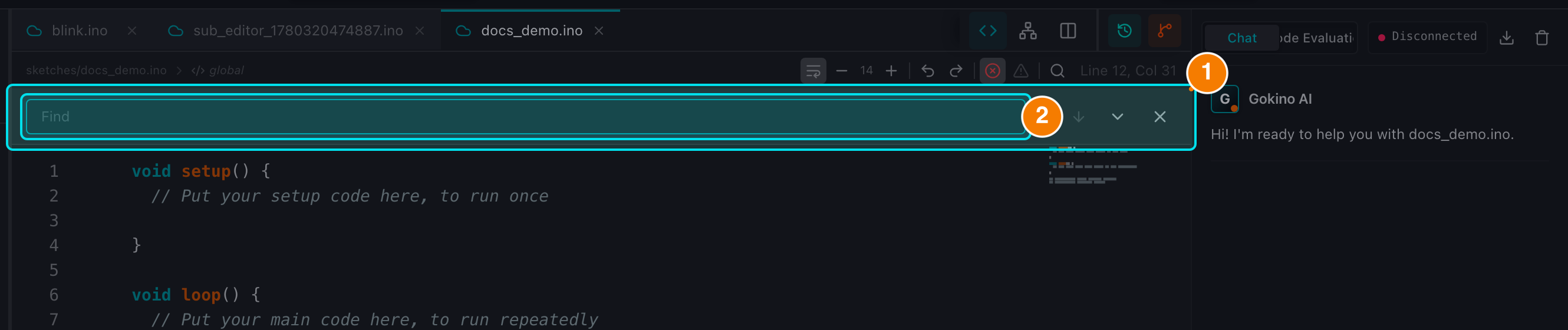
(1) Search panel. (2) Query and match counter.
Search Panel
A search-and-replace tool is integrated directly into the editor.
Ctrl/Cmd + Fopens the find bar with a match counter (e.g.,1 of 3) and Up/Down navigation.Ctrl/Cmd + Hadds the replace field; Replace All applies the change to the whole file and marks it as modified.- The panel closes with the
✕button at its right edge.